Do Google Tasks roll over to the next day?

By Ezra Halevi · Published 2026-10-11 · Last updated 2026-10-11
No. Google Tasks doesn't roll unfinished tasks over to the next day. A task you don't finish keeps its date and becomes overdue. Google does still show it: under "Past" in the Google Tasks app, and in a pending-tasks list on today in Google Calendar. But moving it to today means changing its date by hand, one task at a time. There's no built-in bulk move.
What actually happens to an unfinished Google Task?
It stays on the day you gave it. Nothing changes its date. Three things happen instead:
- In the Google Tasks app, if you sort a list by date, uncompleted tasks show at the top under "Past" (Google Tasks Help).
- In Google Calendar, Google's help page says a list of uncompleted tasks from the last 365 days is available on your current day (same page). When Google added this in 2022, it covered the past 30 days and showed as an all-day "pending tasks" entry (Google Workspace Updates). You may still see the 30-day number in older articles.
- The task still counts as overdue. It hasn't moved. It's on its old date, now in the past.
Google's behavior checked on 11 October 2026. Google changes these apps often.
Why do some people say Google Tasks rolls over?
Because seeing a task on today looks like it rolled over. Google Calendar lists your old unfinished tasks on the current day, so it's easy to read that as "it moved to today". It didn't. The date is still the old one, which is why the task shows as overdue. People notice when they open a task, or when old tasks keep piling up on today's list. On Google's own help forum, one person in a thread called "Tasks not moving forward in Google Calendar" found their overdue tasks had "moved backwards to where they were when they went overdue". They wrote: "I just want overdue things to be on 'today'."
How do I move overdue Google Tasks to today on Android?
One at a time:
- Open the Google Tasks app and open the list.
- Sort it by date. Unfinished old tasks show at the top under "Past".
- Tap a task, change its date to today, and go back.
- Repeat for every task you want on today.
On Google's help forum, someone asked how to move a batch of old tasks to the current date. The answer was "there's no way to bulk edit Tasks": you'd need to change the date on each one individually.
Can I move all overdue tasks at once?
Not inside Google's apps. On a computer there are two outside options:
- Power Tools for Google Tasks, a Chrome extension. Its store page says it moves every overdue task to today in one click.
- google-tasks-rollover, a free script on GitHub that rolls overdue tasks over to the current day. You run it yourself, so it's for people comfortable with code.
Both work on a computer. We didn't find anything that does it inside Google Tasks on an Android phone.
What if you want unfinished tasks to move on their own?
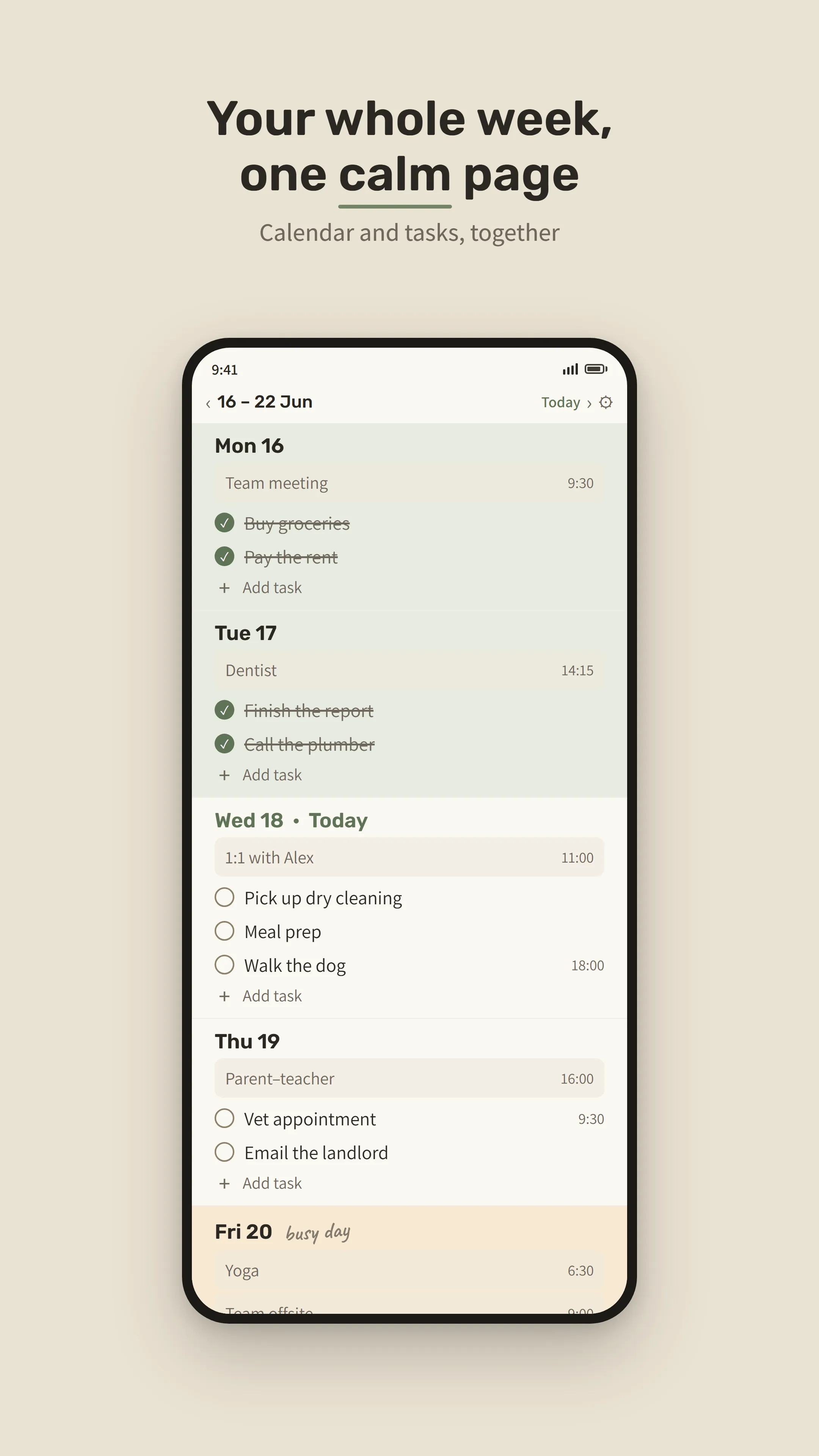
Then you need a planner that keeps its own to-do list and does the moving for you. That's what I built Tend to do. Tend is an Android weekly planner that shows your Google Calendar events beside your tasks and moves unfinished tasks to today on their own. There's no overdue label and no red pile.
- A task you didn't finish moves to today on its own, in the app and on the home-screen widget, and keeps its time.
- If a task belongs to one day only, set it to "Stays on its day" and it won't move.
- Your Google Calendar events show beside your tasks. Tend only reads your calendar. It never changes it.
One honest limit: Tend doesn't connect to Google Tasks. Google Tasks can't do this. Tend can, if your to-dos live in Tend. They stay on your phone. If you want to stay inside Google Tasks, the steps above are your options.
Why did I build a planner where unfinished tasks move?
My life felt like chaos, and nothing was moving. My therapist told me to plan my week, so the things I wanted would start to move. I looked for something simple: a place for my tasks, where whatever I didn't finish rolls to the next day, with no shame and not too much noise. The planners I tried were bloated and expensive. So I built Tend.
— Ezra Halevi
What else do people ask about overdue Google Tasks?
Do Google Tasks roll over on Android?
No. On Android, as on a computer, an unfinished Google Task keeps its original date and becomes overdue. You can see it under "Past" in the Google Tasks app, but you have to change its date yourself.
How long does Google Calendar keep showing overdue tasks?
Google's Tasks help page says uncompleted tasks from the last 365 days are listed on your current day in Google Calendar. When Google launched the feature in 2022, it covered the past 30 days.
Can I move all my overdue Google Tasks to today at once?
Not with Google's own apps. A Product Expert on Google's help forum answered that there's no way to bulk edit Tasks, so you change each date individually. On a computer, a Chrome extension or a script can do it. We didn't find an option for Android phones.
Does Tend sync with Google Tasks?
No. Tend has its own to-do list and doesn't read, import or change Google Tasks. It shows your Google Calendar events beside your tasks, read-only.
Can I stop a task in Tend from moving to the next day?
Yes. Each task can be set to "Stays on its day". It then stays where it is, done or not. Tasks set to "Carries forward" move to today if you didn't finish them.
If you'd rather have unfinished tasks move to today on their own, try Tend on Android. It's free for 14 days with no card, then a one-time purchase. No subscription.
More: what Tend is · who makes it