
No. Google Calendar has two widgets on Android: a schedule list of your tasks and upcoming events, and a month view. There's no week view. To see your whole week on your home screen, you need a widget from another app. Below is what Google's widgets do, and three ways to get a week on your home screen.
Which widgets does Google Calendar have on Android?
Google's help page lists two (Google Calendar Help):
- Calendar schedule: "View your tasks and upcoming events." A list that scrolls from today forward.
- Calendar month view: "Show your schedule one month at a time."
The schedule widget is the closest Google gets to a week view. It shows what's coming up, in order, but not the days of the week laid out side by side or one under the other. The month view shows the whole month, so each day has little room.
Google's widgets checked on 13 October 2026. Google changes Calendar often.
Why do people want a week widget?
Because a week is the size most people plan in. A day is too short to plan around, and a month is too small to read on a phone. In an r/androidapps thread called "Looking for a weekly planner app that provides very large widgets and is customizable" (September 2025), the person asking wrote that they want "a widget to put on my home screen that's big enough to fit a 7 day schedule so I can essentially see my entire week the second I unlock my phone".
How to see your whole week on your Android home screen
Three apps that read your Google Calendar and give you a week widget. Pick by what you want to see in it.
Just your calendar events, as a week: Calendar Widgets Suite
A widget app that shows your calendar events by day, week, month or as a list, with Google Calendar and other calendar apps. Its Play listing names "day, week, month, and list" views and more than 50 themes. It's free to download, with ads and in-app purchases (Google Play).
A full calendar app with a week widget: Business Calendar 2
A complete calendar app. Its Play listing says you can "choose one of 7 professional calendar widgets (month, week, day, agenda widget etc.)", and it can connect your tasks with Google Tasks. It's free, with ads and a paid Pro version (Google Play).
A weekly planner with a week widget: Tend
Tend is the weekly planner I make. Its Week widget shows the next 7 days, starting today. Every day gets its own heading, even a quiet one, and under it that day's Google Calendar events and your tasks. You can check a task off right on the widget, and tapping an event opens it in your calendar app. A task you don't finish moves to today on its own.
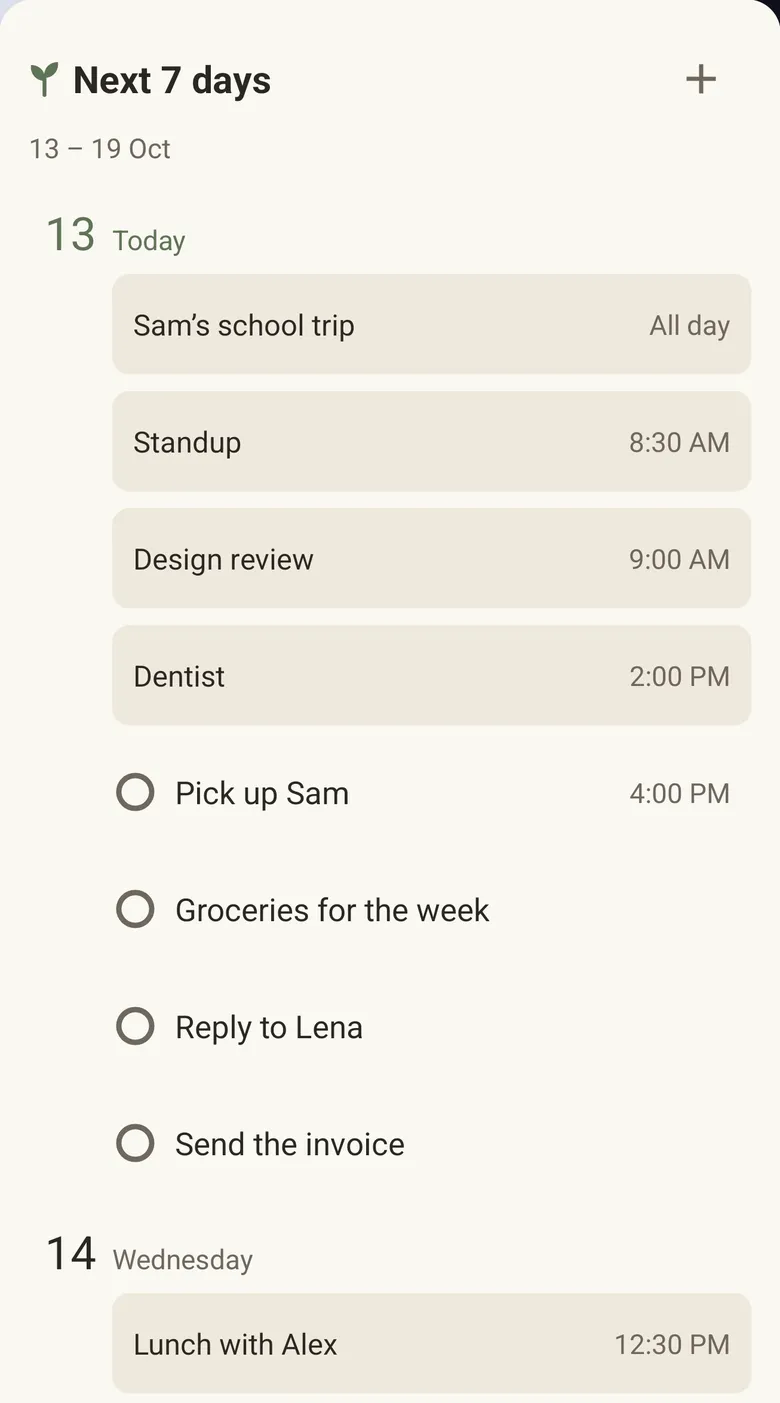
To be clear: Tend keeps its own to-do list. It doesn't read or change Google Tasks, and it only reads your calendar. It never edits it.
App details come from each app's Google Play listing, checked on 13 October 2026. Listings change, so check the current one before you install.
How do I add a week widget?
- Install the app you picked and open it once, so it can ask to read your calendar.
- Touch and hold an empty spot on your home screen, then tap Widgets.
- Find the app in the list and drag its week widget onto your home screen.
- To make it taller, touch and hold the widget, release, and drag the dots on its edges.
These are the steps Google gives for its own Calendar widgets (Google Calendar Help). Menu names differ a little between phone makers.
What does the week look like inside Tend?
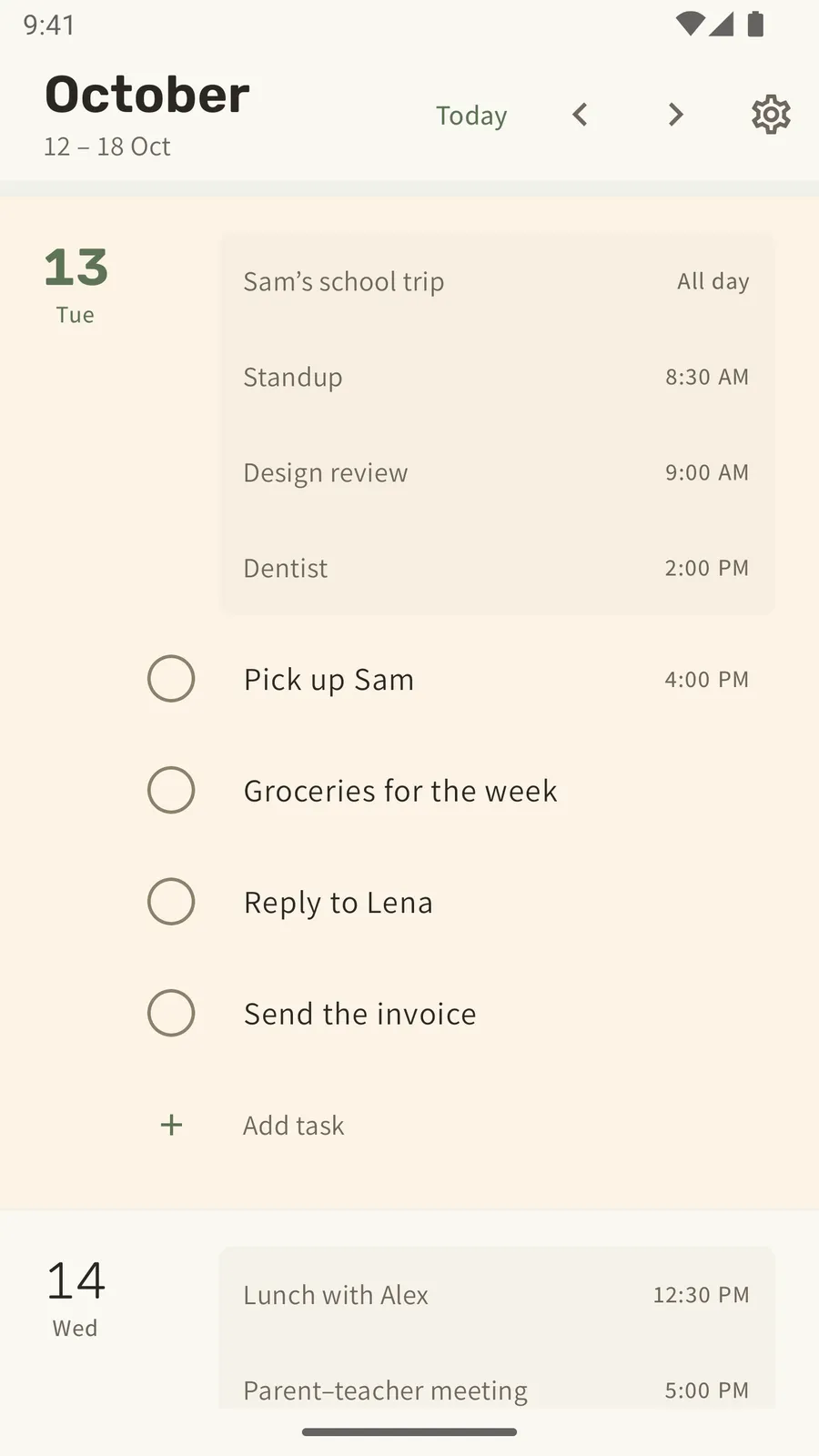
The same week, in the app: each day with its events and tasks on one page. Tap "+" on a day to write a task straight onto it.
Why I built Tend
My life felt like chaos, and nothing was moving. My therapist told me to plan my week, so the things I wanted would start to move. I looked for something simple: a place for my tasks, where whatever I didn't finish rolls to the next day, with no shame and not too much noise. The planners I tried were bloated and expensive. So I built Tend.
 Ezra Halevi
What else do people ask about calendar widgets?
Does Google Calendar have a week view widget on Android?
No. Google's help page lists two Google Calendar widgets for Android: "Calendar schedule", a list of your tasks and upcoming events, and "Calendar month view". There is no week view widget.
Which Google Calendar widget shows tasks?
The "Calendar schedule" widget. Google describes it as "View your tasks and upcoming events." The month view widget shows your schedule one month at a time.
How do I see my whole week on my Android home screen?
Use a widget app that has a week layout and reads your Google Calendar. Calendar Widgets Suite shows your calendar events by day, week or month. Business Calendar 2 has seven widgets, including a week widget. Tend's Week widget shows the next 7 days with each day's events and tasks.
Does Tend's Week widget show Google Tasks?
No. Tend has its own to-do list and doesn't read, import or change Google Tasks. The widget shows your Google Calendar events, read-only, beside Tend's tasks.
Can I check off tasks from Tend's Week widget?
Yes. Each task in the widget has a circle you can tap to mark it done, without opening the app. Tapping an event opens it in your calendar app.