You have three ways. Keep your to-dos as Google Tasks, which show inside the Google Calendar app. Use a to-do app with a calendar view, like Any.do or TickTick. Or use a weekly planner that puts each day's calendar events beside your tasks on one page, like Tend. Which is best depends on where your to-dos live and how much you want to pay.
Can I keep my to-dos inside Google Calendar?
Yes, as Google Tasks. In the Google Calendar app, tap an empty slot, then Task. Google says "tasks must have a date to appear in Google Calendar", and a deadline shows in the "All day" section (Google Calendar Help). It's free and built in.
The catch: unfinished tasks keep their date and become overdue, and you move them one by one (see Do Google Tasks roll over to the next day?). On your home screen, Google Calendar's widgets are a schedule list and a month view, with no week (Google Calendar Help).
Checked on 13 October 2026.
Which to-do apps have a calendar view on Android?
- Any.do: a "combined to-do & calendar app" that syncs with Google Calendar, iCloud and Outlook, with to-do and calendar widgets (Any.do). Its free plan includes the calendar but not recurring tasks; Premium is $7.99 a month or $4.99 a month billed yearly (Any.do pricing).
- TickTick: the free plan's calendar view is "Basic"; Premium, US$49.99 a year, is "Unlimited" with multiple calendar views (TickTick).
- Todoist: the calendar layout is listed under Pro, not the free Beginner plan (Todoist pricing).
In the reviews we read in October 2026, 8,036 Google Play reviews of nine to-do apps, a paid calendar view was one of the things people named when they left. One Todoist user wrote: "As soon as I learned you have to PAY to use a calendar view, this app because as good as useless to me."
What about a planner that shows both on one page?
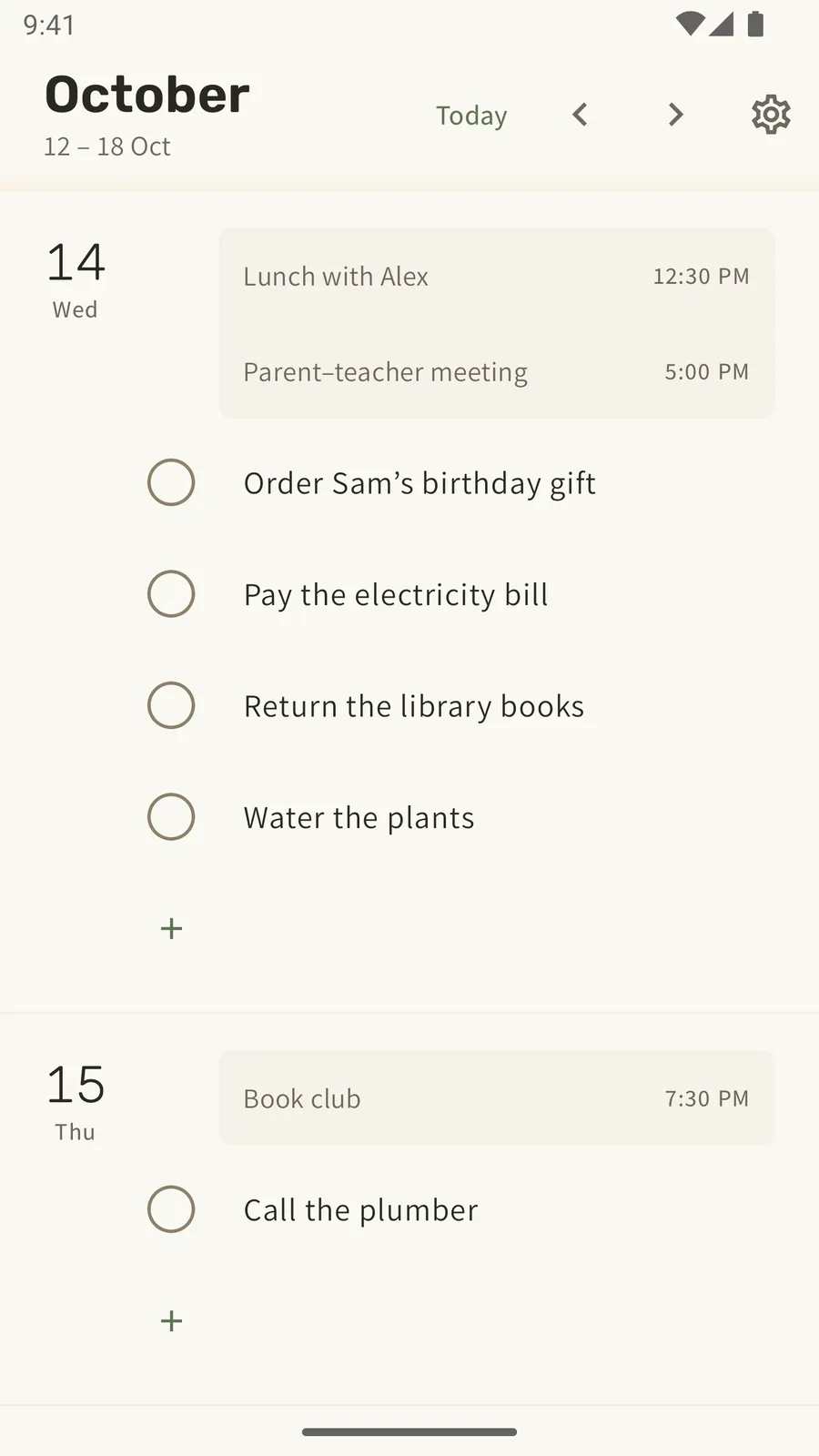
That's what I built Tend to do. Tend is an Android weekly planner that shows your Google Calendar events beside your tasks and moves unfinished tasks to today on their own. Each day of the week sits one under the other, with its events first and your tasks below. Tap "+" on a day to write a task straight onto it. Repeating tasks come back every week, or every 2, 3 or 4 weeks, on the days you pick.
And on your home screen, the Week widget shows the next 7 days the same way:
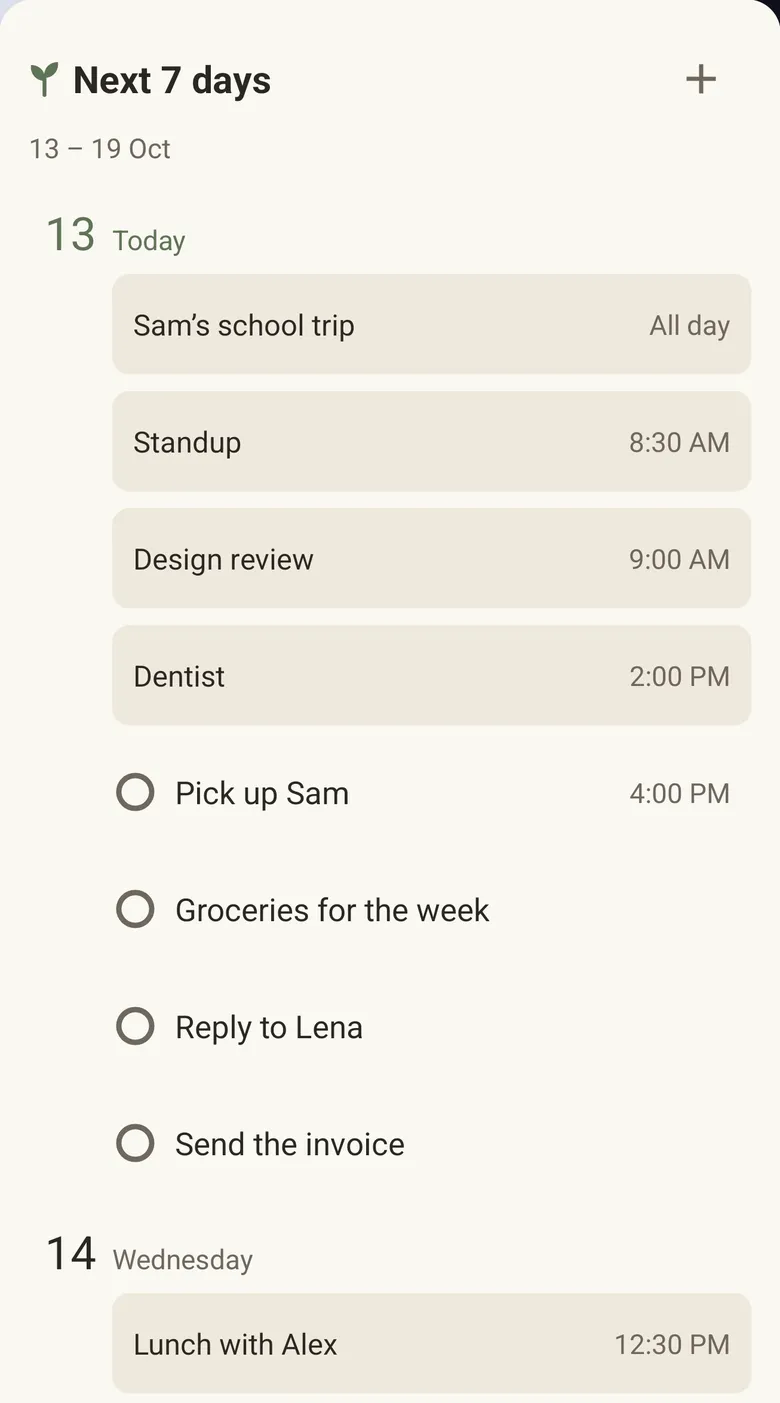
To be clear: Tend keeps its own to-do list. It doesn't read or change Google Tasks, and it only reads your calendar, never edits it. A task with a time can have a reminder, 15 minutes to an hour before, and an optional daily overview lists your day. It has no desktop app and no shared lists. It's Android only, free for 14 days, then a one-time purchase.
Which one should I pick?
- Your to-dos are already Google Tasks and you don't mind moving overdue ones: stay in Google Calendar.
- You need a calendar on your phone and computer, with Outlook or iCloud: Any.do or TickTick.
- You plan a week at a time on your phone, want your events and tasks on one page, and don't want a subscription: Tend.
Why I made Tend
My life felt like chaos, and nothing was moving. My therapist told me to plan my week, so the things I wanted would start to move. I looked for something simple: a place for my tasks, where whatever I didn't finish rolls to the next day, with no shame and not too much noise. The planners I tried were bloated and expensive. So I built Tend.
 Ezra Halevi
What else do people ask about to-do apps with a calendar?
Can Google Calendar show my to-do list?
Yes, if your to-dos are Google Tasks. In the Google Calendar app, tasks with dates appear on your calendar, and a task's deadline shows in the "All day" section.
Which to-do apps show calendar events on Android?
Any.do has a combined to-do and calendar app and widgets. TickTick has a basic calendar view on its free plan and more on Premium. Todoist lists its calendar layout under Pro. Tend shows each day's Google Calendar events beside your tasks.
Is there a free to-do app with a calendar for Android?
Google Calendar with Google Tasks is free. Any.do's free plan includes a calendar but not recurring tasks. Tend is free for 14 days, then a one-time purchase.
Does Tend change my Google Calendar?
No. Tend reads your Google Calendar events so it can show them beside your tasks. It never adds, edits or deletes events.
Can I tick off tasks without opening the app?
In Tend, yes. Tap the circle next to a task on the Today or Week widget. Tapping an event opens it in your calendar app.