The best to-do list widget for Android is one you can tick tasks off on, that refreshes on its own, and that shows more than one day. Google Tasks and Microsoft To Do have free list widgets. TickTick keeps its fuller widgets for Premium. Tend has a Week widget that shows the next 7 days, with your Google Calendar events beside your tasks.
What do the main Android to-do widgets show?
- Google Tasks: a task list. Its widget got a new look in 2026, a bigger add button and colours that match your phone, but no calendar events or days ahead (9to5Google).
- Microsoft To Do: you can "add new tasks to My Day" and "view your existing tasks" from the widget, and open a list from it (Microsoft Support).
- TickTick: the free plan lists widgets as "Basic" and Premium as "Unlimited", at US$49.99 a year (TickTick).
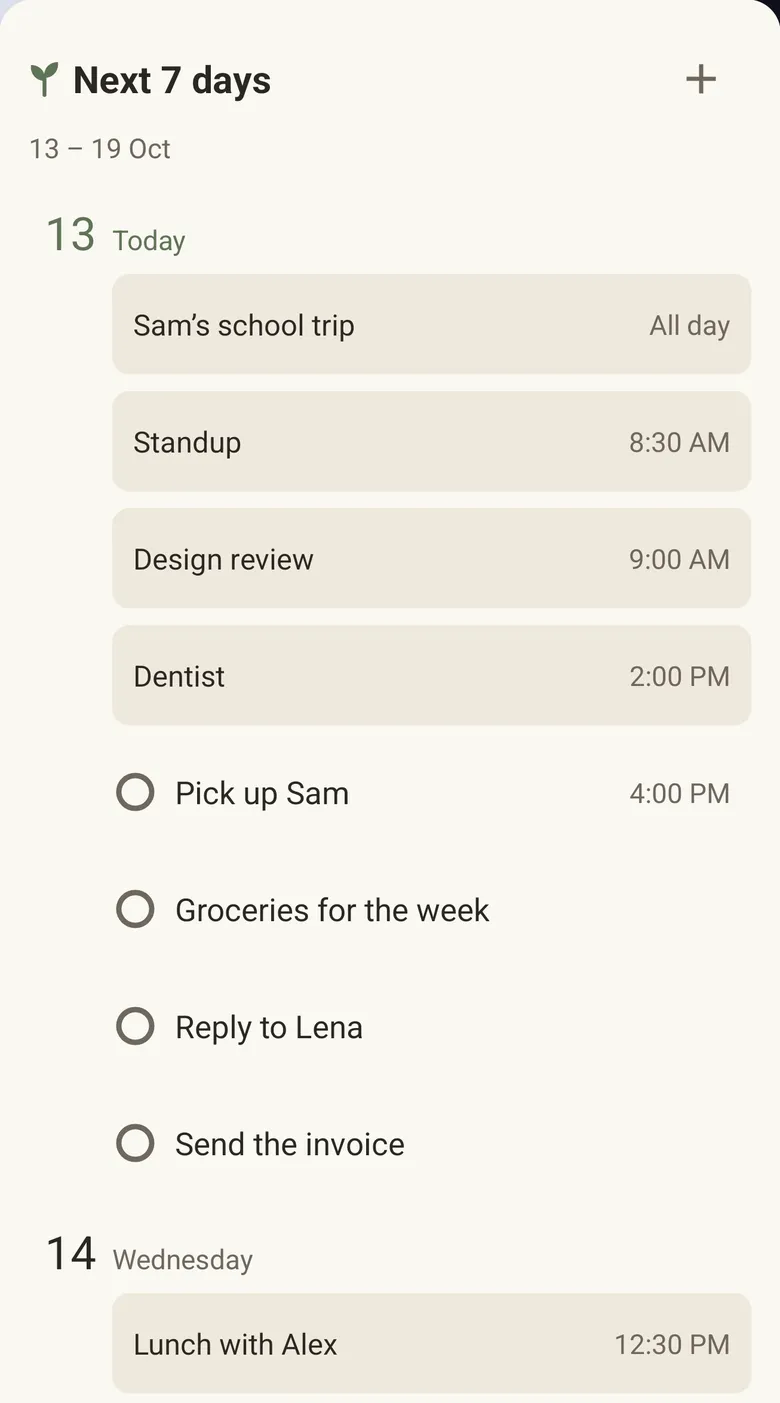
- Tend: two widgets. Today shows today's events and tasks. Week shows the next 7 days, every day with its own heading, its Google Calendar events and your tasks. You can tick tasks off on both.
Checked on 13 October 2026. Apps change their widgets and plans often.
Why do to-do widgets stop working on Android?
It's one of the most common reasons people give up on a to-do app. We read 8,036 recent Google Play reviews of nine to-do apps in October 2026. In Microsoft To Do's 750 low-star reviews, 163 were about the widget, the most common complaint in that app's reviews. The usual story is the same: the widget worked, an update came, and it stopped refreshing. One Google Tasks reviewer wrote: "Doesn't refresh when you add or check things off, until you actually open the app."
What usually fixes it:
- Open the app once after an update, so it can load your tasks again.
- Remove the widget and add it back: touch and hold your home screen, then tap Widgets.
- Keep the app on your phone's internal storage. Microsoft notes that "apps installed on an SD card are not able to show widgets on Android" (Microsoft Support).
- If the Google Tasks widget doesn't show its new design, 9to5Google suggests force-stopping Tasks from App info (9to5Google).
What should a good to-do widget do?
- Let you tick tasks off right there. Opening the app to mark something done defeats the point of a widget.
- Show the days ahead, not just today. A week is the size most people plan in.
- Put your calendar beside your tasks. A list without your appointments only tells half of the day.
- Not punish you. Yesterday's unfinished task shouldn't sit there marked overdue in red.
- Work without an account or a subscription, if all you want is your own list on your own phone.
A to-do widget that shows your whole week: Tend
Tend is the Android weekly planner I make. Its Week widget shows the next 7 days, starting today. Every day gets its own heading, and under it that day's Google Calendar events and your tasks. Tap a circle to tick a task off; tap an event to open it in your calendar app. Anything you didn't finish moves to today on its own, so the widget never fills up with yesterday.
Reminders are your choice per task: give a task a time and Tend can remind you 15, 30 or 45 minutes, or an hour, before it. An optional daily overview lists your day at the time you pick. It has no desktop app and no shared lists, and it's Android only. It doesn't read or change Google Tasks, and it only reads your calendar. If you need a computer app, Google Tasks, Microsoft To Do or TickTick will suit you better. More on calendar widgets in Is there a Google Calendar week widget for Android?
Why I made Tend
My life felt like chaos, and nothing was moving. My therapist told me to plan my week, so the things I wanted would start to move. I looked for something simple: a place for my tasks, where whatever I didn't finish rolls to the next day, with no shame and not too much noise. The planners I tried were bloated and expensive. So I built Tend.
 Ezra Halevi
What else do people ask about to-do widgets on Android?
What is the best free to-do list widget for Android?
Google Tasks and Microsoft To Do both have free widgets. Google Tasks shows a task list, and Microsoft To Do shows My Day and your lists. Neither shows your calendar events or the days ahead next to your tasks.
Why did my to-do widget stop updating?
Most often after an app update. Open the app once, then remove the widget and add it again. Microsoft says widgets don't work when the app is installed on an SD card, so keep it on internal storage.
Is there a to-do widget that shows the whole week?
Yes. Tend's Week widget shows the next 7 days, with each day's Google Calendar events and your tasks under it. Google Calendar's own widgets are a schedule list and a month view.
Can I tick off tasks from the widget?
In Tend, yes: tap the circle next to a task on the Today or Week widget, without opening the app. Tapping an event opens it in your calendar app.
Does Tend's widget show Google Tasks?
No. Tend keeps its own to-do list and doesn't read or change Google Tasks. It shows your Google Calendar events, read-only, beside Tend's tasks.