
Most of the time the widget is fine and the calendar isn't syncing. Samsung's fix: in Calendar, tap the menu, then Sync now; turn on auto sync for your Samsung and Google accounts; and switch your calendars on under Manage calendars. If events still don't appear, force stop Calendar and clear its data. Below are the steps, the widget's colour settings, and a week view.
How do I fix a Samsung Calendar widget that shows no events?
The widget shows what the Calendar app shows. Samsung's support page says that when you can't see an event, "your phone's sync settings may not be configured properly" (Samsung Support). Its steps, in order:
- Open Calendar, tap the menu (three lines), then tap Sync now.
- In Settings, turn on Auto sync personal data, then open each account (Samsung and Google) and turn its sync on.
- Back in Calendar, tap the menu, then Manage calendars, and switch on every calendar you want to see.
- Still nothing? In Settings > Apps > Calendar, tap Force stop, then Storage > Clear data. Reopen Calendar and let it sync.
One more check on newer phones: since One UI 7 you can pick which calendars each widget shows, and even "create 2 separate calendar widgets with a different calendar on each one" (Samsung One UI 7). If one widget is empty and the app isn't, open that widget's settings and look at which calendar it's set to.
Which widgets does Samsung Calendar have?
- Month and Today: "your monthly calendar alongside your planned events for the day" (Samsung UK).
- Countdown: the days left until one event. In One UI 7 you can add it straight from an event (Samsung One UI 7).
- Google Calendar's widgets also work on Galaxy phones if you use Google's app: "Calendar schedule", a list of your tasks and upcoming events, and "Calendar month view" (Google Calendar Help).
To add one: touch and hold the home screen, tap Widgets, then find Calendar in the list (Samsung Support).
Checked on 24 November 2026. Samsung changes Calendar with each One UI version.
How do I change the Samsung Calendar widget's colour or transparency?
Touch and hold the widget, then tap Settings. Samsung lists Color, "a background color for the widget", and Transparency, but adds that "the available settings will vary with every widget" and some have none (Samsung Support).
Is there a Samsung Calendar week widget?
Not in Samsung's own lists. Its support and One UI pages describe month, Month and Today and countdown widgets, and Google's two widgets are a schedule list and a month view. People have been asking for one for years; a 2017 thread on Samsung's own forum starts "Is there any way to have the calender widget display in the weekly view?" (Samsung Community). To see a whole week on a Galaxy home screen, you need another app.
A week widget for Galaxy phones: Tend
Tend is the Android weekly planner I make. Its Week widget shows the next 7 days, starting today. Every day gets its own heading, and under it that day's events from the calendars your phone syncs, such as your Google Calendar, and your tasks. Tap a circle to tick a task off; tap an event to open it in your calendar app. Anything you didn't finish moves to today on its own. You can match the widgets to the app or give them their own colour, from 20 soft colours.
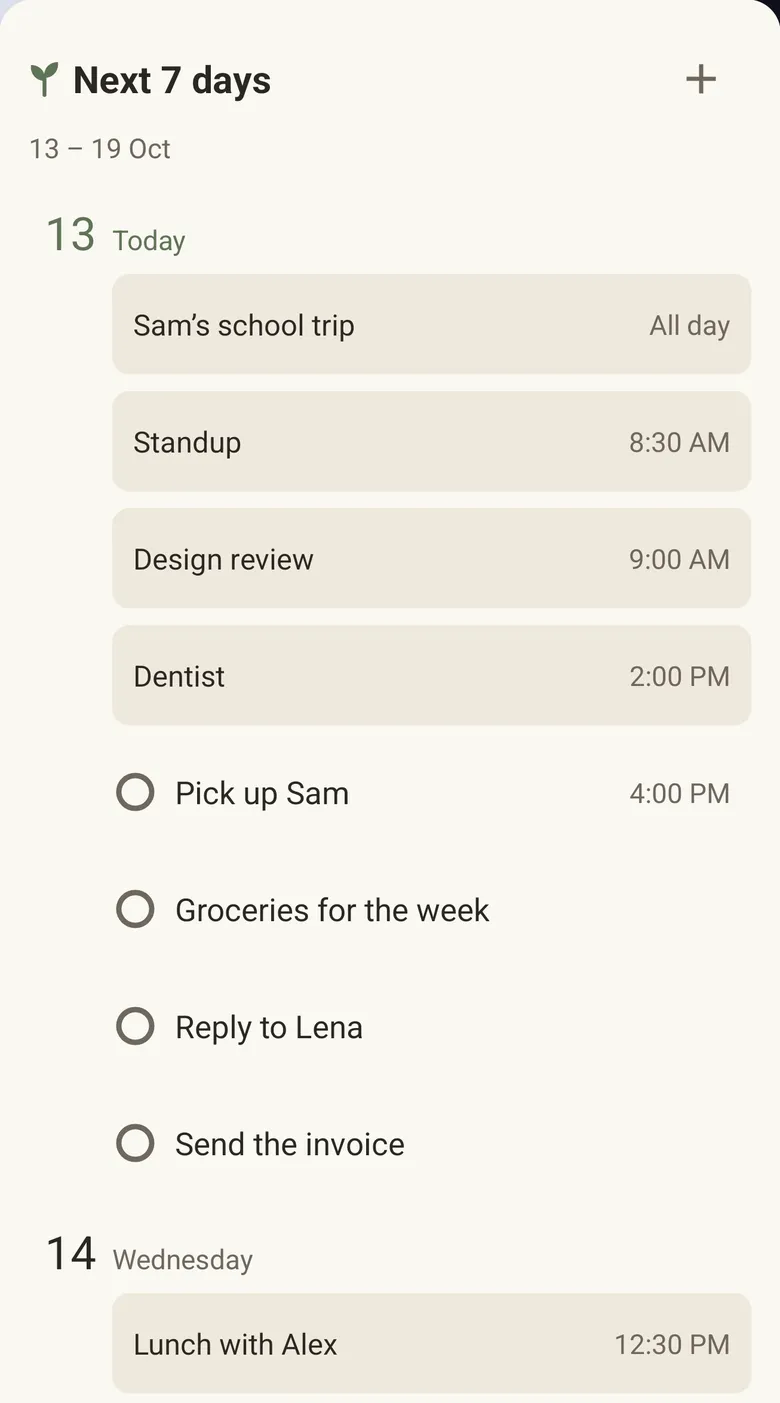
Tend only reads your calendar; it never changes it. It keeps its own to-do list, so it doesn't show Samsung Reminder or Google Tasks. There's no desktop app and no shared lists. If you only want a month grid, Samsung's own widget is the better fit. More on week widgets in Is there a Google Calendar week widget for Android?
Why I made Tend
My life felt like chaos, and nothing was moving. My therapist told me to plan my week, so the things I wanted would start to move. I looked for something simple: a place for my tasks, where whatever I didn't finish rolls to the next day, with no shame and not too much noise. The planners I tried were bloated and expensive. So I built Tend.
 Ezra Halevi
What else do people ask about the Samsung Calendar widget?
Why is my Samsung Calendar widget blank?
Usually the calendars aren't syncing or aren't switched on. In Calendar, tap the menu, then Sync now, and check Manage calendars. Make sure auto sync is on for your Samsung and Google accounts in Settings.
Why don't my Google Calendar events show on my Samsung phone?
Samsung says to turn on Auto sync personal data, turn on sync for your Google account, and make sure the Google calendars are switched on under Manage calendars in the Calendar app.
Can I change the colour of the Samsung Calendar widget?
Samsung's widget guide says to touch and hold a widget, then tap Settings, where many widgets have Color and Transparency. Settings vary by widget, and not every widget has them.
Does Samsung Calendar have a week widget?
Samsung's support and One UI pages list month, Month and Today, and countdown widgets, but not a week view. A week widget needs another app, such as Tend's Week widget.
Does Tend work on Samsung phones?
Yes. Tend runs on Android 8.0 and newer, including Galaxy phones. Its widgets show the events from the calendars your phone syncs, such as your Google Calendar, next to Tend's own tasks.